Pinterest Tips & Tricks

June 15, 2012

Happy Friday! Today I thought I might share a few tips I’ve learned with Pinterest. You may have heard of a few of these before, but I hope that you find some of them helpful!

*Find out how to see which images from your site/blog have been pinned
*Find the original source of any image
*Let friends, bloggers and websites know that you’ve pinned them
*Add ‘search engine optimization’ to your pins
*Collaborate with friends on boards

Are you on Pinterest? It’s quite addicting!

1. If you have a blog and are curious as to which images from your site have been pinned, there’s a quick and easy way to find out.

To find out which images have been pinned from any site, add the url address of that site after: www.pinterest.com/source/. For example, Pepper Design Blog would be: www.pinterest.com/source/pepperdesignblog.com. This little tip shows which images have been most recently pinned, not all pinned images ever.

2. Pinterest has really improved in helping users to find the original source of an image, but it’s not quite there yet. You can quickly jump back to the original url of an image by selecting the link right under the pinner’s name:

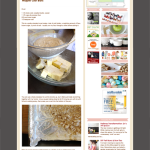
But here’s my favorite trick! When that doesn’t work, or when you want to find the original source to any image online, simply pick up and drag that image into a ‘new tab’ in your browser window. Here I’m dragging one of the posts from my PDB feed from above right over the little ‘+’ sign that indicates a new tab.

The new location that opens is where the previous pinner found your image. You might have to drag and drop the image a few times, but eventually you’ll be led right back to the original post. The only time that this doesn’t work is if the pinner pinned an image from the homepage of a website rather than the particular post that that image came from (which is why it’s key be sure you’re on an individual post url when you’re pinning images, too. You can usually select the heading of any post on any homepage to be taken to that post’s individual url). PS A commenter mentioned that you can double click on an image and it will take you right to the source – I tested it out and it works! An even easier solution!

3. If you ‘follow’ a pinner, you can notify them that you’ve pinned their image (much like Facebook and Twitter). This is helpful if you want to ask a question or offer a comment on an image that you’d like the originator to see, or if you want to share the image with a particular friend. Tag someone in a description by using the @ symbol and then by selecting from the drop down list as you type out the name/blog/website that you’re following.

4. Pinterest uses the descriptions of images to help other users find those images when they are searching for a particular word or phrase. Feel free to help Pinterest out by using hash tags (#) in front of keywords in any description for an image you’re pinning, it will help your fellow pinners at some point in the future! PS Furthermore, Pinterest will default to a description that just lists what the image was originally saved as ‘desserts_ballooncupcakes_400px.jpg’ which isn’t useful at all to other pinners. Be sure to rename to help future searchers out :) .

5. This features is actually new to me because it wasn’t around when I joined Pinterest, but now you can collaborate with friends directly just be identifying them when creating a new board. Now the bride-to-be can add her bridesmaids for collecting ideas, or a  designer can work directly with a client by collaborating on an Living Room Makeover board.

Well there you have it, five new tips that I’ve found to be very helpful. Not on Pinterest yet? You’ll love it :) , and come say hi by finding me right here.

Have a wonderful weekend!


Tags: ,
Posted in Blog World News | 17 Comments »

The Project Gallery is Live!

November 14, 2011

Very exciting news today! The Project Gallery – that I’ve been working on for such a long time – is live!

Find the direct link to the Gallery in the menu bar just below the header.

The Project Gallery is a database of projects that anyone and everyone can upload their work to. It functions similarly to a giant Link Party (if you’ve participated in one of those), and here’s the super simple idea behind it:

1. Add your own: Upload your project to share with others by using the submission form in the right hand sidebar (give your project a title, add a link to your direct post, choose an image and identify a category and as many tags that apply). An image will appear in the gallery along with a direct link out to your blog post.

OR

2. Search for inspiration: Search through projects by category in the left sidebar and then narrow down your results by tags. You might be hunting for a tutorial on distressing a dresser or on how to make pinwheel cupcake toppers – this gallery can help you find a blog post for either!

The Gallery is small today but I hope that it grows and grows. I’ve asked a few bloggers to help me add initial projects so that she’s not totally empty on launch day: Janell of Isabella & Max Rooms, Jennifer from Seakettle, Cristin from Simplified Bee, Disney of Ruffles and Stuff, and Courtney of Pizzazzerie.

Once monthly I’ll host a round-up on the blog of all projects added, so this is a great way to feature your room and furniture makeovers, parties, crafts, wardrobe boards and recipes! All submitted projects are linked directly back to the original blog post through the image in the gallery.

*******************************************

Spot a bug? Feel free to let me know at: morgan at pepperdesignblog dot com so I and my awesome co-programmer can get right on fixing it.

Speaking of co-programmer, let me introduce you to a very hard working, sharp and kind fellow who as of the latter half of this year has helped me keep up with some of the programming needs on the site. When break-fixing small errors or developing new features (like this one!) became too taxing on my own, I enlisted the help of Tim (who can be found at: technotim@gmail.com) to assist. I highly recommend his work for the smallest (questions like ‘why is my formatting off?’) to the biggest (‘I’d like a shopping cart or custom plugin for my site’) projects because he always goes above and beyond and is incredibly fair with hourly pricing. Every blogger needs a really great programmer in their back pocket.

I do hope you like the new Project Gallery and I hope you find it a useful tool for looking up and searching for projects (from so may different sources of inspiration) quickly :) .


Posted in Blog World News, Project Gallery | 16 Comments »

2nd Blogiversary, Day 5: Round-Up & New Additions!

November 11, 2011

The 2nd Blogiversary Week has come to a close… but in case you’re just tuning in, here’s a round-up of stuff to check out:

Day 1: Wardrobe Giveaway with EmersonMade (one of my favorite online husband+wife clothing boutiques!)
Day 2: DIY Pack Giveaway offering up an awesome paint sprayer (makes furniture & cabinet makeovers a snap), a professional set of paint brushes and the super handy X-ACTO kit
Day 3: Meet & Greet with PDB and a behind-the-scenes look at our blog, family and home
Day 4: Favorite Home Decor Giveaway with Room & Board, The Company Store and Rifle Paper Co. (three of my favorite stores to find great additions for the house)

In other news…

I had every intention of announcing the very new Project Gallery (a place where bloggers can submit their projects in one large, awesome database) this week, but with a few last minute coding/styling issues and so much going on I’ve pushed that out to Monday. It’s finished! Come back to check it out :) .

I have another exciting announcement today! If you’re a fan of the wardrobe styleboards that are posted here on a not-so-regular basis, I’m so happy to share that I’m bringing on a very style-savvy contributor who will make sure that our styleboard gallery is packed to the max with inspiring ideas.

Maryam of milkfriendly.com will be joining us beginning next week! And between Maryam and myself we hope to post on favorite wardrobe ideas more often. I would describe Maryam’s style as bohemian-modern, with a big dash of practical. Bohemian in the sense that she takes risks (that always work out beautifully), modern in that her looks will resonate with nearly all, and practical in price and wearability. Welcome, Maryam!

And that, my friends, concludes the 2nd Blogiversary week at Pepper Design Blog.

Related Posts Plugin for WordPress, Blogger...
Tags:
Posted in Blog World News | 5 Comments »