
Pepper Design Blog

A Little of This & That... Renovating, Decorating, DIY Projects & Family

pepper_header_flower

Affiliates

Gilt Ad Joss & Main Ad
pepperdesignblog's ideabooks

$.13 Christmas Cards {and Downloads)

December 12, 2013 by Morgan

We’ve been slow to get our Christmas cards in the mail. Even though we did something really out of the ordinary this year and, on a whim, worked with a professional photographer to capture some family shots – back in early November – I still haven’t gotten it all together card-wise. We might order cards to mail out, I might work with a local print shop… I have no idea at the moment.

But until then, I’ve been playing with diy Christmas cards. Because they’re super cost-effective and super easy to make. I’ll share the process today so that if you’d like to create your own $.13 Christmas cards you can.
Christmas Card Overlays | DIY Cards | PepperDesignBlog.com

Costco in our neighborhood prints photos for $.13, but they might be $.09 or $.15 depending on your local Walgreens/Target/Sam’s Club. And if you mount them on paper like I did for my samples they’ll be just a bit more.

So here’s how these easy diy Christmas cards work. I’ve created five holiday overlays to download – these are .png files that you can download to your computer and then ‘overlay’ on top of your family photos following these steps through the totally awesome and free online photo editor program, Pixlr.

Here are my five overlays:
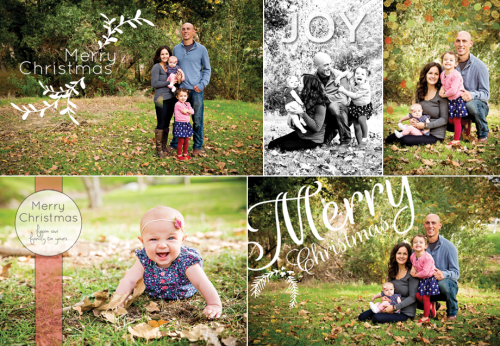
Christmas Card Overlays | DIY Cards | PepperDesignBlog.com

They can be adjusted for horizontal or vertical photos, I’ll show you how I did that as well.

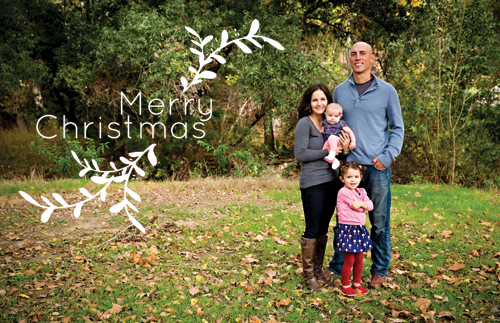
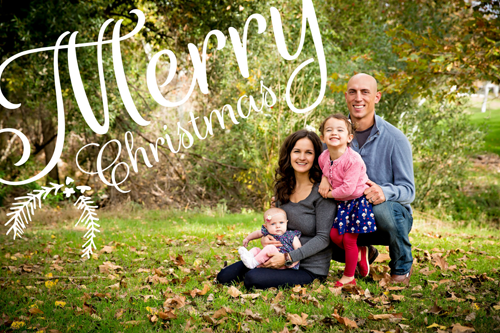
First things first, here’s what the photo looks like with the overlay on top:

Christmas Card Overlays | DIY Cards | PepperDesignBlog.com

But here’s what you’ll be downloading:

Christmas Card Overlays | DIY Cards | PepperDesignBlog.com

This is so easy. No editing programs to download, nothing to buy. Pixlr is a free tool that you use right on the internet.

Once you’ve saved the overlay to your computer, open Pixlr in a new tab in your browser. Go to File | Open and select your family photo (I’m using my ‘Merry Christmas Holly’ overlay as the example). You’re using the full size photo straight out of your camera (don’t resize to a 4×6 or 5×7, your printing company of choice will do that for you).
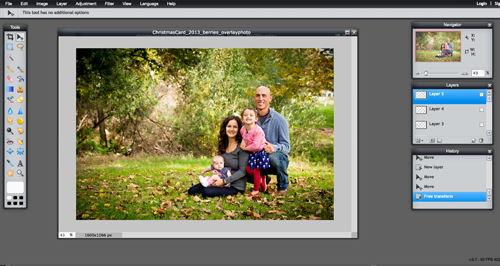
Christmas Card Overlays | DIY Cards | PepperDesignBlog.com

Then go to File | Open and select the downloaded overlay off of your computer. See the grey and white boxes in the background? That means that the background is transparent with the exception of the white lettering.
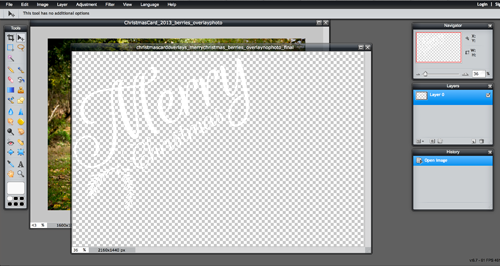
Christmas Card Overlays | DIY Cards | PepperDesignBlog.com

Now go to Edit | Select all to select the entire canvas of your overlay.
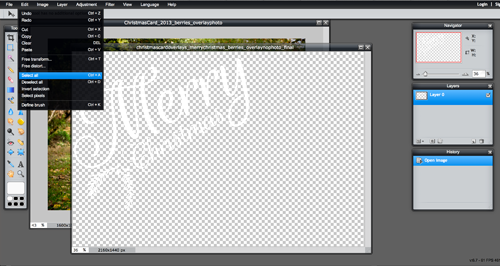
Christmas Card Overlays | DIY Cards | PepperDesignBlog.com

Then Edit | Copy to copy the white lettering.
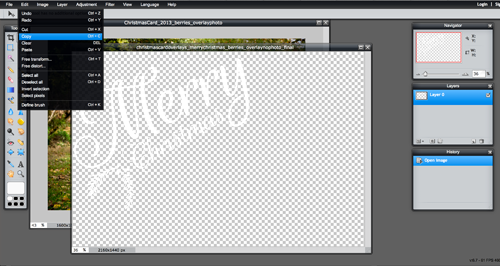
Christmas Card Overlays | DIY Cards | PepperDesignBlog.com

And moving back to your family photo, Edit | Paste.
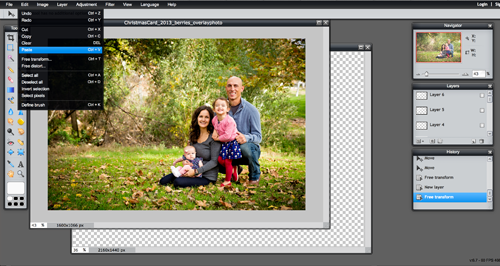
Christmas Card Overlays | DIY Cards | PepperDesignBlog.com

Christmas Card Overlays | DIY Cards | PepperDesignBlog.com

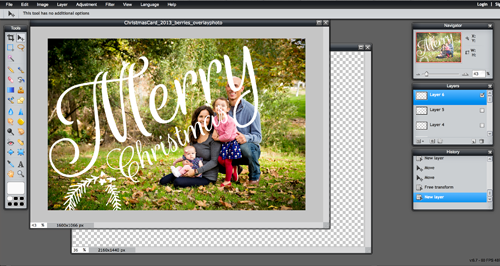
Now the overlay might be an odd size for your picture, so you can ‘transform’ it by going to Edit | Free transform.

Note: These overlays are big – you’ll want to downsize most of them to fit your photo but not upsize (or make them any bigger) or they’ll be pixelated. If the overlay is too small for your photo, first resize your photo to an 8×10 (or something still larger than 4×6) and then try pasting the overlay again.
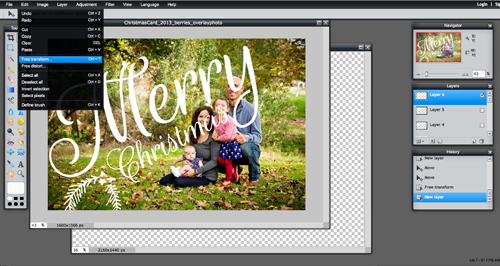
Christmas Card Overlays | DIY Cards | PepperDesignBlog.com

Resize, rotate, move the overlay around until it looks just right (this is why these overlays can be used on vertical photos easily as well).
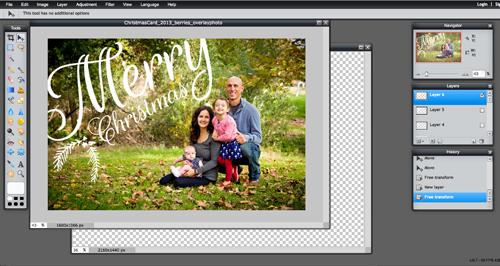
Christmas Card Overlays | DIY Cards | PepperDesignBlog.com

You could also use the built in text tool to customize your card with your names.
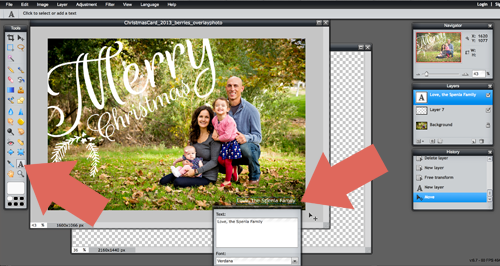
Christmas Card Overlays | DIY Cards | PepperDesignBlog.com

Now it’s time to save. Go to File | Save.
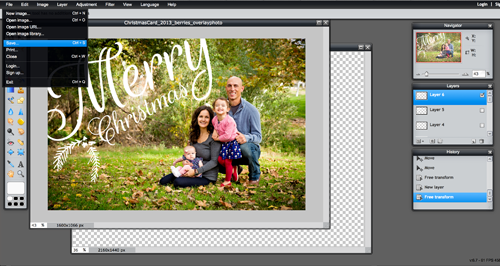
Christmas Card Overlays | DIY Cards | PepperDesignBlog.com

Select the very highest quality (default is .jpg and that’s just fine for our purposes).
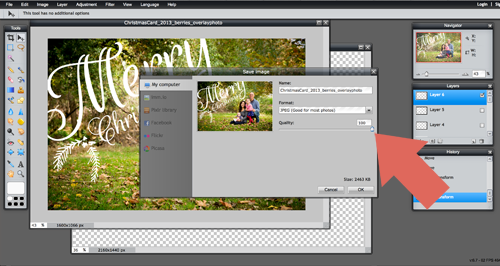
Christmas Card Overlays | DIY Cards | PepperDesignBlog.com

And upload to your favorite printing store (I chose Costco and printed with a white trim – which is an option with most photo printing companies). You might want to run a batch of one or two before printing all just to make sure they turn out okay. I went back to Costco twice before they were just right – but it’s totally worth saving $100.
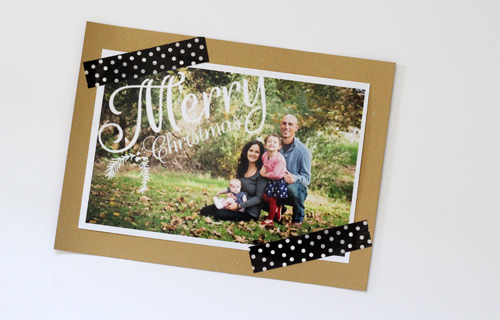
Christmas Card Overlays | DIY Cards | PepperDesignBlog.com

Here are the overlays to download (download by right clicking the link that says HERE and not the photo with the example).
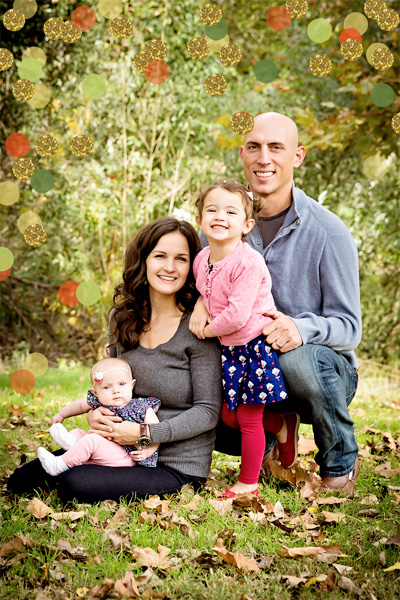
Christmas Card Overlays | DIY Cards | PepperDesignBlog.com

Christmas Confetti overlay download HERE.
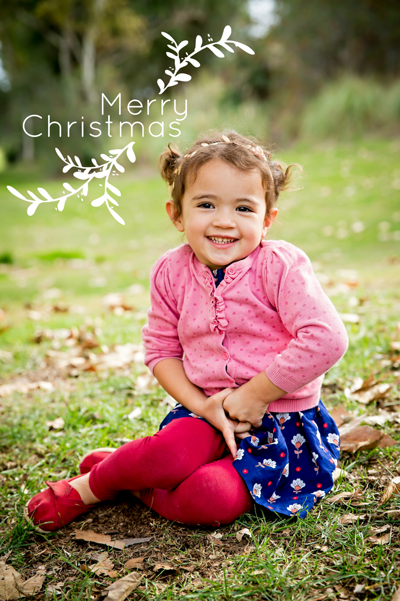
Christmas Card Overlays | DIY Cards | PepperDesignBlog.com

Christmas Card Overlays | DIY Cards | PepperDesignBlog.com

Merry Christmas Garland overlay download HERE.

Christmas Card Overlays | DIY Cards | PepperDesignBlog.com

Joy Lettering download HERE.

christmascardoverlays_christmasbadge_500

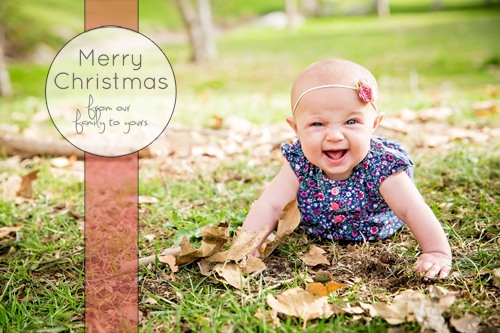
Christmas Badge download HERE.

Christmas Card Overlays | DIY Cards | PepperDesignBlog.com

Merry Christmas Holly overlay download HERE.

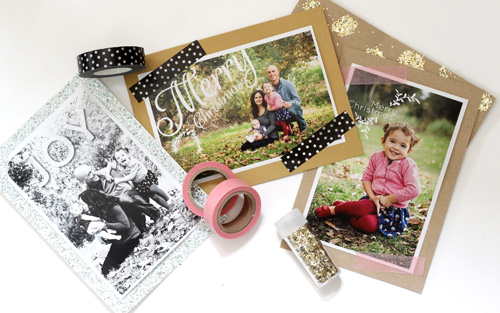
If you want to go above and beyond basic printing, you could mount your photos on pretty paper. Here are a few of my favorites:
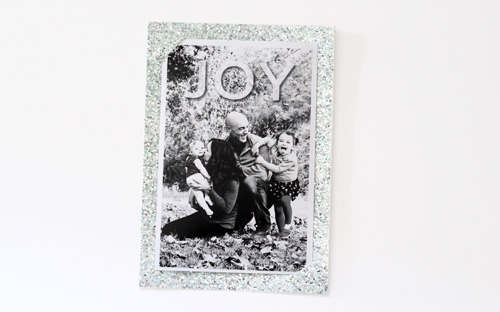
Christmas Card Overlays | DIY Cards | PepperDesignBlog.com

Glittery blue for our Joy photos (to attach the photo to the cardstock I made two little slits in the corners).
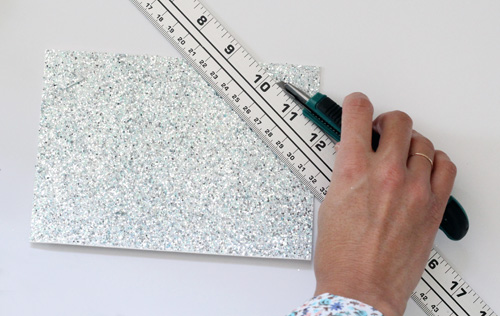
Christmas Card Overlays | DIY Cards | PepperDesignBlog.com

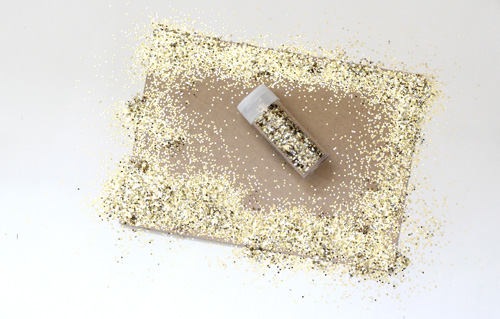
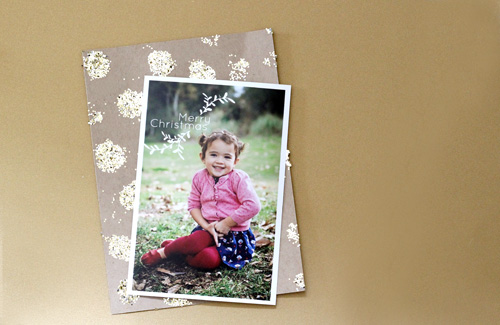
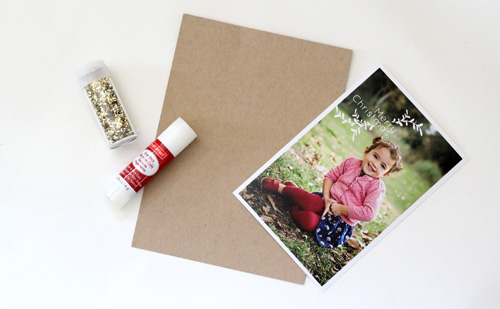
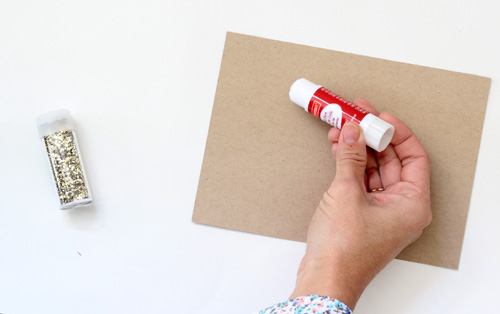
For a fun glitter background, I dotted brown cardstock with a glue stick and shook glitter over the wet glue.
Christmas Card Overlays | DIY Cards | PepperDesignBlog.com

Christmas Card Overlays | DIY Cards | PepperDesignBlog.com

Christmas Card Overlays | DIY Cards | PepperDesignBlog.com

Christmas Card Overlays | DIY Cards | PepperDesignBlog.com

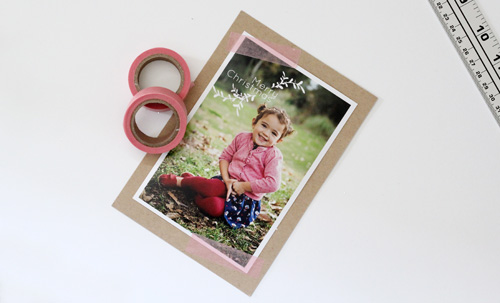
Or a basic washi tape is fun!

Christmas Card Overlays | DIY Cards | PepperDesignBlog.com

The black polka dot (from Michaels) might be my favorite.

Christmas Card Overlays | DIY Cards | PepperDesignBlog.com

There you have it! $.13 Christmas cards for the whole fam. Shoot me an email (morgan at pepperdesignblog dot com) or leave a message in the comments if you have any questions. I’ll make updates to this tutorial as I hear feedback.

Now, back to my Christmas cards I go :).

PS That photographer I mentioned? That’s Stefanie of Joie de Vivre Photography. She’s amazing and does very reasonably priced ‘mini sessions’ for the whole family. We’ll definitely be working with her again!

Related Posts Plugin for WordPress, Blogger...

- posted on December 12, 2013 Filed Under: Christmas, Craft Projects, DIY, Downloadables, Family & Friends, Holidays, Olivia, Photography, Projects, Taylor Rose, Tutorial

« Girls’ Room Update: Swing Arm Wall Sconces
2013 Holiday Gift Guide: UncommonGoods »

Comments

  1. Lori Ann Gregory says

    November 15, 2015 at

    Have you made any more holiday card overlays? This is our second year making our photo cards using your method and some of these overlays :) Thanks so much!

    • Morgan says

      November 17, 2015 at

      I would LOVE to make more and it makes me so happy to see your comment! I will see if I can squeeze some in :).

  2. Leslie says

    December 15, 2013 at

    First of all, those family photos are amazing! And $0.13 is definitely far less than what we spent. Your overlays are beautiful…this may just have to be my method next year. Thanks so much for the freebies!

  3. Jennifer says

    December 12, 2013 at

    Oh my goodness, Morgan! You’re going to laugh when you see my card. It’s Kraft paper, washi tape, big script-y Merry Christmas… great minds think alike!

    • Morgan says

      December 12, 2013 at

      That is awesome!! I can’t wait to see them! Ha, I love it :-).

Posted on Thursday, December 12th, 2013

Trackbacks

  1. Valentine's Day: Two Photo Overlays - Pepper Design Blog says:
    February 5, 2015 at

    […] how I made a few photo overlays for Christmas? So super simple and perfect for family. I came up with two Valentine’s Day photo overlays to […]

  2. Our Family Christmas Cards - Pepper Design Blog says:
    November 26, 2014 at

    […] from the A Beautiful Mess photoshop mini collection, Christmas card editing tips, plus more tips (Pixlr is a great, free alternative for editing) to check […]

Welcome to my little slice of the web where I practice finding family, career, homemade & inspired balance on a daily basis. This is where I capture my happy moments, and I'm honored that you're here to join us. Home + creativity + good eats + journaling + life as a working mom. Read more...

  • Email
  • Facebook
  • Google+
  • Instagram
  • Pinterest
  • RSS
  • StumbleUpon
  • Twitter

Categories

Craft Projects CategoryCrafty Projects Good Eats & Recipes CategoryGood Eats Entertaining Ideas CategoryEntertaining Ideas Decorating Projects CategoryDecorating Style Boards CategoryStyle Boards Everything Holiday CategoryHolidays
Twice Ad Hautelook Ad One Kings Lane Ad

Search

Categories

Craft Projects CategoryCrafty Projects Good Eats & Recipes CategoryGood Eats Entertaining Ideas CategoryEntertaining Ideas Decorating Projects CategoryDecorating Style Boards CategoryStyle Boards Everything Holiday CategoryHolidays

Daily Dose

Favorite Posts

Dog Days of Summer: Craft Kits for Kids

Summer Craft Kits for Kids

August is a slower month for our family. Preschool summer school is out, dance lessons are taking a brief break for the month, our family vacation is

Our Double Stroller: Mountain Buggy +One Review

A Mountain Buggy +One Double Stroller Review

I'll preface by saying that this is not a sponsored review - we've found an awesome double stroller and we love it! Our Mountain Buggy + One has served

Wardrobe Style Board: A Work-From-Home Uniform

Wardrobe Style Board: A Stay-At-Home Mom Uniform | Cropped Light Jeans, Tan Sven Clogs, White Madewell V-Neck T-Shirt, Colorful Necklace, Gold Earrings | PepperDesignBlog.com

tan clogs | pocket tee | light jeans | gold disc earrings | colorful necklace It's not uncommon for people to come and go from our house all day long,

Happy 2nd Birthday, Taylor Rose!

Happy 2nd Birthday, Taylor Rose! An Infographic for My Girl | PepperDesignBlog.com

This weekend Taylor turned two. Taylor is such a bright, wonderful light in our lives. She is our funny, spunky little daughter that will do just about

How to Listen to Audiobooks on OverDrive

Intro to Audiobooks on OverDrive Public Library | PepperDesignBlog.com

Liv has developed a big interest in audiobooks as of late. One of my favorite ways for her to spend her 'quiet time' while Taylor and Marley nap is for her

Pistachio, Caramel & Sea Salt Chocolate Bars

Pistachio, Caramel & Sea Salt | Father's Day | PepperDesignBlog.com

Father's Day is not so far away, so here's an easy gift idea that can be made in advance or (literally) the night before. Homemade chocolate bars can be

Liv & Taylor-isms

Liv & Taylor-isms | Funny Things Kids Do & Say | PepperDesignBlog.com

Sometimes I capture something so funny/adorable/sweet that I can’t help but make note of it. Because Taylor is now expressing herself in full sentences, I

30 Things That I’ve Learned By 30

30 Things I've Learned by the Age of 30 | PepperDesignBlog.com

Today is my 30th birthday. I don't feel much older, but hearing that number roll out of my mouth feels as though I'm closing on a big chapter in my

Featured

Featured
VRBO San Diego Flying Bridge Vacation Rental cool toys for kids

Favorite Topics

House Tour

House Tour

160px Ad Space 3

160_wide_ad

160px Ad Space 2

160_wide_ad

160px ad space

160_wide_ad
Thibaut cool toys for kids Nordstrom Piperlime
Twice Ad Hautelook Ad One Kings Lane Ad

Tags

Accessories Baby Shower Bedroom Before & After Birthday Blue Bridal Shower By Color Christmas Construction Crafty Solutions Decorating Desserts Dining Room Dinner Parties DIY Fabric Furniture Green Guest Blog Guest Interview Halloween Home Kid's Party Kitchen Living Room Nursery Office Orange Paint Parties & Entertaining Patterns & Color Pink Purple Recipes Red Sewing Teal Thanksgiving Turquoise Tutorial Wardrobe - Fall Wedding white Yellow

Contributors

Blog Contributor: Anna Kate
Thibaut cool toys for kids Nordstrom Piperlime

Affiliates

Gilt Ad Joss & Main Ad
pepperdesignblog's ideabooks

Sponsors

U-Fab Ad
Zulily

Subscribe

Add your email to receive posts in your inbox:

Subscribe

Add your email to receive posts in your inbox:

Welcome to my little slice of the web where I practice finding family, career, homemade & inspired balance on a daily basis. This is where I capture my happy moments, and I'm honored that you're here to join us. Home + creativity + good eats + journaling. Read More…

  • Email
  • Google+
  • Instagram
  • Pinterest
  • RSS
  • StumbleUpon
  • Twitter
December 2013
MTWTFSS
 1
2345678
9101112131415
16171819202122
23242526272829
3031 
« Nov   Jan »

Copyright © 2026 · Foodie Pro Theme by Shay Bocks · Built on the Genesis Framework · Powered by WordPress